Team
Invite your team
Add colleagues and get them into QR BASE.
A team admin sends the invitation by email. The colleague clicks Accept invitation within 7 days and they're in.
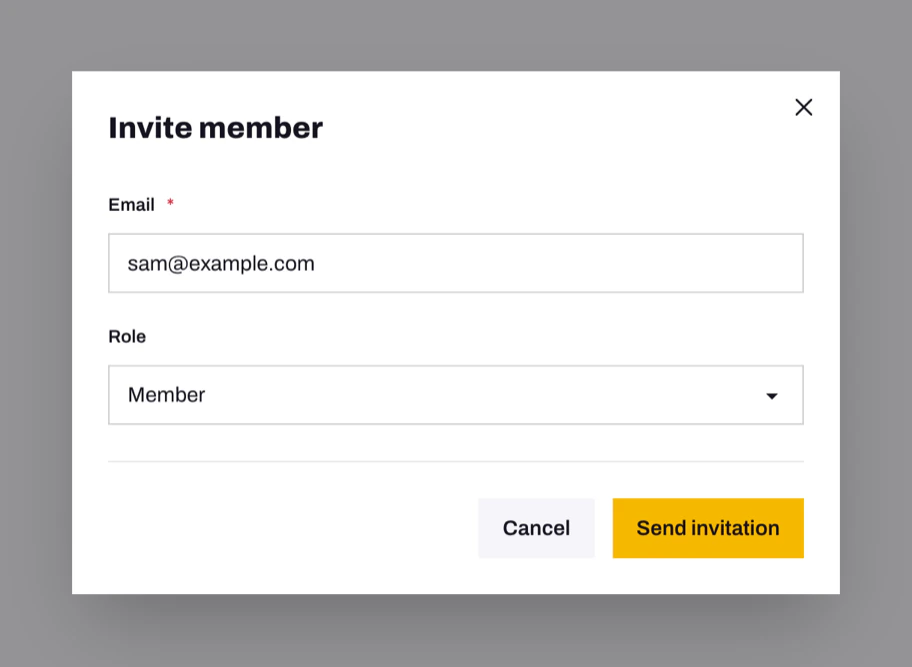
Send an invitation
- Open Team settings.
- Click Invite member.
- Enter their email address and choose a role: Member or Team admin. See Who can do what.
- Click Send invitation.
The invitation appears under Pending invitations until it's accepted. Click Revoke to cancel it.
Accept an invitation
- New to QR BASE: click the link in the email, choose your name and a password, then Create account and join.
- Already have an account: log in, then click Join team. You can switch between your teams with Switch team in the sidebar.
Problems
- The invitation expired. Invitations last 7 days. Ask a team admin to invite you again; the new link replaces the old one.
- "This invitation is for …" You're logged in with a different account. Log out, then log in with the address the invitation was sent to.
- Invite member is greyed out. A team holds up to 10 people, pending invitations included. Revoke unused invitations or remove someone first.
- The email never arrived. Check your spam folder, then ask a team admin to send it again.
Still need help?
Email us and we will get back to you.